Blog · October 11, 2026 · 10 min read
Claude Code Skills for Content: How I Make Khan Academy Style Videos for Free
Most Claude Code skills are prompt shortcuts. khan-explainer is the other kind: a renderer Claude cannot improvise, plus the rules learned from failed renders. Here is how it works, what it costs (nothing), and the tricks that transfer to any content skill.
I opened a LinkedIn post last week with "I think Claude Code skills are mostly useless." It got about 30,000 impressions and a lot of disagreement, so let me be precise about what I meant, and about the one skill that changed my mind.
A skill is a markdown file Claude Code reads when your request matches its description. Most of the ones I have seen are prompt shortcuts: a paragraph of instructions you would otherwise type again. Claude is already good enough to do that work from a plain sentence. Saving the sentence is not worth a repo.
The exception is a skill that ships something Claude cannot improvise in one shot. A renderer. A capture recipe that took a day to get right. A list of rules learned from thirty failed outputs. That kind of skill is a tool with a manual, and the manual is what the model reads. khan-explainer is that kind. I built it to make Khan Academy style explainer videos, where a pen draws on a blackboard while a voice explains, and the whole thing runs free on a laptop with no API keys. Two days after I published it, it had 58 stars, 16 forks and a merged pull request from someone I had never met.
What it makes
- Blackboard lessons. A diagram drawn stroke by stroke while the voice explains it. The original Khan Academy look.
- Draw-over-UI tutorials. Arrows, circles and numbered steps drawn over your own product screenshots. "Press this, then this."
- Real-audio clips. A YouTube video or podcast in, vertical shorts out. The speaker's own voice plays while the board is drawn to their words. It can also cut the speaker out of the frame and stand them in front of the board.
Every mode renders as chalk on a blackboard or marker on a whiteboard, landscape or vertical. One environment variable switches the theme, and a single beat can flip the board mid-video.
The stack, and why it costs nothing
There is no video model anywhere in this. Four boring pieces do the work:
- 01An HTML canvas draws the handwriting. Every letter and shape is a path, revealed a little more on each frame. A handwriting font plus progressive stroke drawing is enough to read as a hand.
- 02Playwright opens that page in headless Chromium and screenshots it frame by frame. This is the same tool people use for browser tests. It is also a perfectly good frame grabber.
- 03macOS `say` speaks each line to an audio file. It is robotic, but it is free, it is on every Mac, and it reports exactly how long each clause takes.
- 04ffmpeg stitches the frames and the audio into an MP4.
That is the full bill of materials. The commercial tools that make this style of video charge monthly subscriptions. Manim can do it and is beautiful, but it is a library you learn, not a prompt you type. AI video generators bill per second and cannot draw a diagram that stays consistent for sixty seconds. For a teaching video, the pen is the point, and the pen is just canvas strokes.
The one idea that makes it work: the voice drives the clock
Every attempt at this that I have seen fails the same way. Someone writes a script, guesses that a sentence takes three seconds, animates to three seconds, and then the voice lands early or late. By the fourth sentence the pen is drawing the wrong thing.
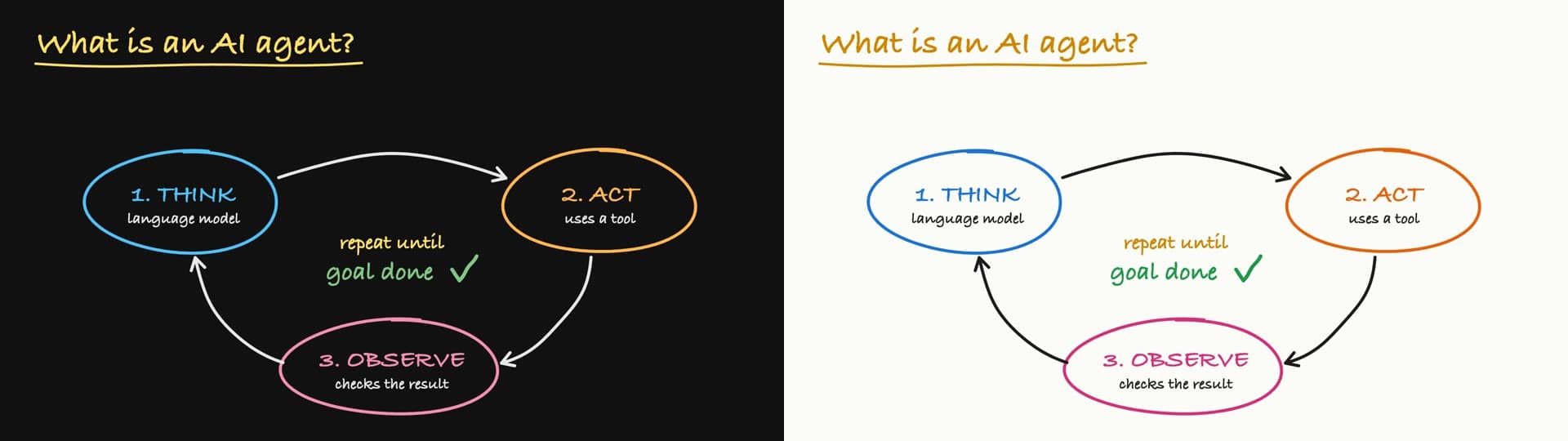
khan-explainer never guesses. A scene is a list of beats. A beat is one spoken clause plus the drawing that happens while it is said. The renderer speaks each beat first, measures the audio, and gives that beat's drawing exactly that long. Nobody types a timestamp, so the pen cannot run ahead of the words.
scene({
  beats: [
    { say: 'What is an AI agent?', draw: p => {
        write('What is an AI agent?', 60, 85, p, { size: 56, color: C.yellow });
    } },
    { say: "It's software that uses a language model to think,", draw: p => {
        stroke(oval(300, 330, 155, 82), seg(p, 0, .4), { color: C.blue });
        write('1. THINK', 300, 328, seg(p, .4, 1), { size: 40, color: C.blue, center: true });
    } },
  ],
})
p runs from 0 to 1 while the clause is spoken. seg(p, 0, .4) spends the first 40% of the beat on the oval and the rest on the label. That is the entire timing model. Claude writes these scene files from a one-line prompt because the rules are short enough to hold in its head.
Using it
git clone https://github.com/haiderfarooq3/khan-explainer ~/.claude/skills/khan-explainer
cd ~/.claude/skills/khan-explainer/scripts && npm install && npx playwright install chromium
Then ask Claude Code for the video you want. "Make a 30-second Khan-style explainer on how DNS works." "Draw over these screenshots and show a new user how to send their first invoice." "Khanify this YouTube video, light and dark." Claude writes the scene, renders it, reads the contact sheet, fixes what is wrong, and hands you the MP4.
Tricks that transfer to any content skill
The renderer is maybe a third of the value. The rest is the rules in the skill file, and most of them apply to any skill that produces content, whether that is video, slides, ads or diagrams. These are the ones that earned their place.
1. Make the skill grade its own output
Every render prints a contact sheet: the board at the end of every beat, in one image, plus every beat full-size as b000.jpg, b001.jpg and so on. The renderer also prints WARN lines for text that runs off the board or one label sitting on another. Claude is told to read the sheet and fix every warning before showing you anything. A render takes seconds, so it iterates three or four times and you only see the last one. Whatever your skill makes, give the model a cheap way to look at the result. Without it, you are the QA department.
2. Lay out with the free voice, switch on the expensive one last
say is free and instant, so all the layout work happens with it. When the board is right, you add an ElevenLabs voice id to the scene. The whole script is read in one take so it sounds like one person talking, then cut back into beats at the character timestamps the API returns. Takes are cached by a hash of the script, so re-rendering the same words is free. Changing one drawing costs nothing. Changing one word buys a new take. Order the work so the paid step runs once.
3. Keep the units small enough to re-render
The most common question under the LinkedIn post was from a teacher: if one step in a worked solution is wrong, can I fix that step, or does it need a full rerun? The answer is that you edit one beat and re-render, and the new file exists a few seconds later. That is only possible because a beat is a few lines of JavaScript, not a timeline in an editor. Design the unit of content so a human can point at one of them and say "that one is wrong."
4. Measure, never eyeball
For draw-over-UI tutorials the skill captures screenshots with Playwright and saves getBoundingClientRect() for every button and field it will point at. It never reads coordinates off the image. It also measures again for every state, because elements move when they are focused, typed into, or when a menu opens over them. The view() helper maps capture pixels to board units so the rings land on the right button at any crop. The early tutorials where I let the model guess coordinates from the screenshot all circled the wrong thing.
5. Write the script once, theme-neutral, and cut everything from it
The video in this post exists in four cuts: dark and light, landscape and vertical. They share one voice take because the script never says "blackboard" or "left". The theme is a flag, the aspect ratio is a size, and the voice cache does not care about either. If your content needs variants, decide what the variants are before the first expensive step, and keep anything variant-specific out of the shared layer.
6. Hit a target length by changing words, not speed
A quick explainer runs about words ÷ 3 + beats × 0.15 + 1.3 seconds, within roughly 5%. A ten-second explainer is about 24 words in 5 beats. A 60-second tutorial is about 145 words in 15 beats. The skill file includes this formula so Claude can plan a 30-second video that is actually 30 seconds, instead of speeding up the voice until it fits. Speeding up the voice is how you get the "too AI" complaint.
7. Put the failures in the skill file
Every bad render taught the skill something, and the lesson went into SKILL.md where the model reads it. A few examples. ElevenLabs' multilingual model at speed 1.12 with style 0.35 sounded, in the words of the first person I showed it to, "too AI", so the skill now uses the v3 model and speeds the finished video with ffmpeg's atempo instead. Screenshots are dimmed towards the board colour so chalk stays readable on a busy screen. Private data is hidden in the page before any still is taken. Demos are never staged in a shared or public channel. One render stalled forever once, so the build script has a watchdog. None of this is clever. It is the difference between a skill that works on the second try and one that works on the tenth.
8. Real audio is a different product, not a feature
The clip mode downloads a video with yt-dlp, transcribes it locally with faster-whisper, and lets you mark the moments worth a board. Each clip gets its own scene drawn to the speaker's own words, and a macOS Vision cutout can stand the speaker in front of the board for the vertical version. One 20-minute talk became 22 clips in an afternoon. The reason to mention it here: the renderer did not change at all. Once timing comes from measured audio, the audio can come from anywhere.
Where it falls short
- The default voice is robotic. For anything you publish, you will want ElevenLabs or a real recording.
- It is macOS first.
sayand the Vision cutout are Apple APIs. The renderer itself is a browser page, and the first outside contribution (right-to-left writing for Arabic and Hebrew) was tested on Windows by drivingboard.htmldirectly, but a Windows voice path does not exist yet. - The handwriting is a font drawn progressively, not a model of a hand. It reads well at normal speed and less well paused.
- It is not affiliated with Khan Academy. The name describes the look.
Why this is a blog post and not just a LinkedIn post
Two days after the post went up, I ran a sweep of every public surface I could reach: X, Reddit, Hacker News, YouTube, newsletters, skill directories, package registries. Outside GitHub, not one human had mentioned the repo. The only pickups were two crawlers. Bing had not indexed the repository at all. The LinkedIn post itself, with its 30,000 impressions, is invisible to every search engine; the exact hook line returns nothing.
That is the deal with social: a day of reach, then nothing. A video you post to a feed is gone from the record in a week. A page on a domain you own is a search result for years, gets cited by AI answer engines, and is where the repo can point back to. This post is that page. If you build something and it does well on a feed, write it down somewhere with a URL you control, the same week, while the traffic is still there to link to it.
If you want to see the other formats I make this way, the content catalogue has one finished example of each. If you want this kind of pipeline built for your product, the usual place to start is the contact page. And if you just want the skill, it is on GitHub, MIT licensed. Go draw something.
Questions people asked
- Is khan-explainer really free?
- Yes. It renders with an HTML canvas in headless Chromium (Playwright), the voice built into macOS (say), and ffmpeg. There are no API keys, accounts, or usage limits. The only optional paid part is swapping the Mac voice for an ElevenLabs voice, and even that works on the free tier for short scripts.
- Does it work on Windows or Linux?
- The default voice and the talking-head cutout are macOS only. The renderer itself is a browser page driven by Playwright, so the first outside contributor tested their change on Windows by driving board.html directly. Linux works with espeak-ng in place of say. Full Windows support would need a different TTS call.
- How long does a render take?
- Seconds. The 65-second video in this post rendered in under a minute on a laptop. The voice is generated first, then each beat's drawing is fitted to it, then ffmpeg stitches frames and audio.
- Can I fix one wrong step without re-rendering everything?
- Yes. A scene is a list of beats. Edit the beat, re-render, and you have a new MP4 in seconds. If you are using an ElevenLabs voice, the take is cached, so changing only the drawing costs nothing.
- Can it use my own voice or a real person's voice?
- Yes. The real-audio mode takes a YouTube link or an audio file, transcribes it locally with faster-whisper, and draws the board to the speaker's words. One 20-minute video produced 22 clips. For a synthetic human voice, set an ElevenLabs voice id on the scene.
- Is it affiliated with Khan Academy?
- No. 'Khan Academy style' describes the look: handwriting on a dark board, drawn as it is explained. The project is independent and MIT licensed.
Haider Farooq is an AI engineer and data scientist based in Lahore, Pakistan — core engineer on TryCook.ai, developer at Aligno, and creator of MarkSafe.net. He builds agentic AI systems, RAG pipelines, and automation for teams worldwide. Work with him.