Blog · October 27, 2026 · 9 min read
paper-reel: A Free Claude Code Skill That Draws Cut-Paper Explainer Reels From One Prompt
Nobody drew this reel. I gave Claude Code one reference video, it measured the look and wrote it as code: paper shapes, stamps, a mascot in a hat, captions that pop on every word. Here is how the skill works, why the voice has to go first, and what it still gets wrong.
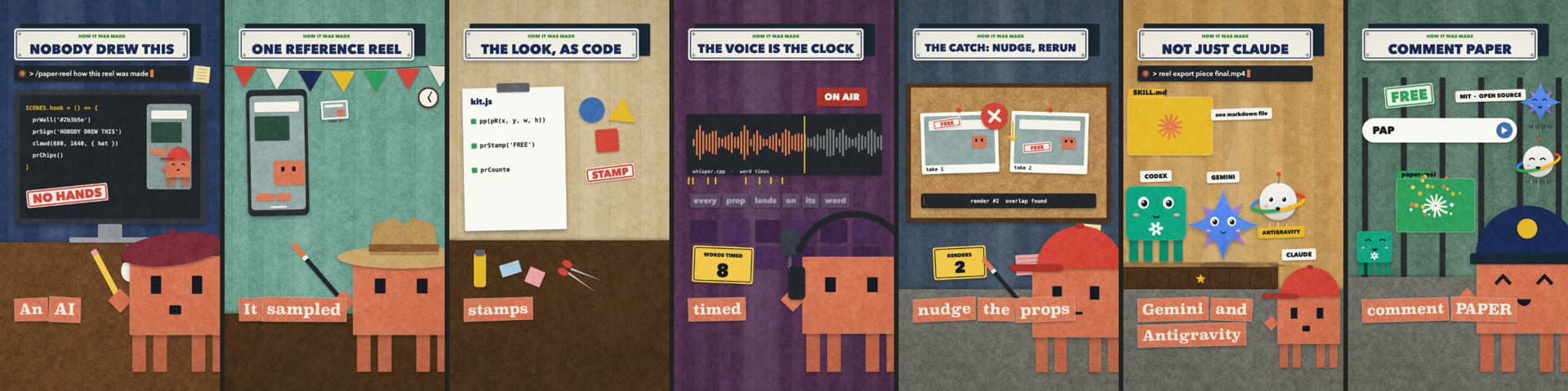
Nobody drew the video below. I typed one prompt and Claude Code wrote the whole reel as code: the paper shapes, the rubber stamps, the mascot in a different hat every scene, the captions that pop on each spoken word. It rendered in about 30 seconds on my laptop and cost nothing. The skill that did it is called paper-reel, and this post is about how it was made and what it still gets wrong.
Two weeks ago I wrote about khan-explainer, a skill that draws Khan Academy style lessons, and said most Claude Code skills are prompt shortcuts that are not worth a repo. The useful kind ships something the model cannot improvise in one shot: a renderer, a measured recipe, a list of rules learned from failed outputs. paper-reel is the second skill of that kind, and it came out of a very ordinary request.
Where it came from
I had a reference reel from a motion designer. Flat cut-paper shapes with no outlines, a grain over everything, a muted palette of slate, navy, mustard and cream, a little box mascot wearing a different hat per scene, and captions that pop in one torn paper scrap per word. The kind of thing an agency charges a few hundred dollars for and takes a week to deliver. I wanted that look for my own explainers, and I wanted it free, local and repeatable.
So I gave Claude Code the reference video and asked it to make the same thing for a short script. Here is roughly what happened over one evening:
- 01It sampled the frames and measured the look. It pulled stills with ffmpeg, read the palette, worked out the layout grid (sign top-left, terminal bar under it, mascot bottom-right cropped by the frame edge, captions bottom-left) and noted the paper grain, the drop shadows and the fact that nothing has an outline.
- 02It wrote that look as a kit. One JavaScript file with the paper primitives: a rounded paper rect, an ellipse, a polygon, a grain pass, a shadow. Then the story props on top: a screwed-on headline sign, a typing terminal, a rubber stamp that slams down, a counter that runs up, a checklist, a repo card, the mascot with its hats and moods.
- 03It built the first reel, and the first frames were wrong. Captions over the mascot. A stamp hitting on the wrong word. A counter that finished before the sentence did. We fixed those by looking at stills and nudging numbers, which is the whole workflow now.
- 04Then the rules went into the skill file. Every fix became a line in
SKILL.md, so the next reel starts from the lessons instead of repeating them.
A scene is one spoken line
The script is six to eight lines, about 20 seconds. Every line gets exactly one scene with a hard cut just before the voice starts it. That is the rhythm of the reference style and it turns out to be a very good constraint for a model: the unit of work is small, it has a clear job, and you can point at one and say "that one is wrong".
SCENES.free = () => {
  const wl = VW('free', 'laptop').t0;              // when "laptop" is said
  prWall('#c9b28a');                               // the scene's world
  prSign('RUNS ON YOUR LAPTOP');                   // the headline sign
  prStamp('LOCAL', 450, 690, PR.green, wl, { rot: 0.08, size: 70 });
  clawd(CLAWD_X, CLAWD_Y, { hat: 'cap', mood: TT > wl ? 'happy' : 'neutral' });
  prChips();                                       // one paper caption per word
};
That is a complete scene. A wall, a sign, one hero prop cued off a word, the mascot, and the captions. The skill file tells Claude that every scene needs those five things plus a few details of background life (a clock, bunting, a lamp, a moon), and that the bottom-left band stays clear for the captions. Claude writes seven of these from a one-line prompt because the rules fit in its head.
The voice goes first, and every word gets a time
In khan-explainer the voice drove the clock at the level of a clause: speak the line, measure it, give the drawing that long. For a reel with stamps and counters that is not enough. A stamp has to slam on the word "free", not somewhere in the sentence that contains it.
So the pipeline does two things before any frame is drawn. Kokoro, a small open text-to-speech model, reads each line to a WAV file on your Mac. Then whisper.cpp listens to the result and writes the start and end time of every word into voice.json. A scene can ask VW('free', 'laptop').t0 and get the moment the word "laptop" is spoken. The stamp, the counter, the mascot's face change all hang off those numbers. Nobody types a timestamp, so the props cannot drift from the voice.
This also means you can read the transcript whisper heard and catch what the voice mangled. Kokoro once turned "Mac" into "map", so the script says "laptop". It pronounces Claude as "clawed", which is correct. The skill file keeps a list of these.
The stack, and why it costs nothing
- An HTML canvas draws every frame. Paper shapes are paths with a grain texture and a soft shadow. Captions are paper scraps with a torn edge. The mascot is about forty lines of rectangles and ellipses.
- Playwright opens that page in headless Chromium and screenshots it frame by frame. 30 frames a second, 1080 by 1920.
- Kokoro is the voice. It runs locally through
kokoro-onnx, sounds decent at 1.3x speed, and costs nothing. - whisper.cpp times the words. The base English model is about 150 MB and runs in a couple of seconds for a 25-second clip.
- ffmpeg stitches frames, voice, a ducked lo-fi bed and a few paper sound effects into one MP4 at about -14 LUFS.
There is no video model anywhere in this. The renderer, the frame tools and the kit core are vendored from animate, an MIT-licensed project by cth9191 that already knew how to draw cut-paper shapes and export them. What paper-reel adds is the measured style, the mascot, the story props, the voice and timing tools, a starter template and a worked example. Credit is in the NOTICE file.
The catch: the first frames are never right
I want to be honest about the workflow, because "one prompt" undersells the looking. The first render of any reel has something wrong. A caption lands on the mascot's hat. Two props overlap on a word. The sign is too long for its plate. The fix is always small, but a human has to see it.
So the skill ships two tools for looking. reel still renders a handful of frames at chosen seconds into one strip, which Claude reads before showing you anything. reel check renders the whole piece twice and fails if any text overlaps or if the two renders differ by a pixel, which catches a scene that used Math.random() or the clock. A render takes 30 seconds, so Claude runs the loop three or four times and you only see the last one. Whatever your skill makes, give the model a cheap way to look at the result. Without that, you are the QA department.
One markdown file and one command
The skill is SKILL.md plus a bin/reel tool with seven subcommands: doctor, new, voice, build, still, check and export. Claude Code finds it in ~/.claude/skills. But there is nothing Claude-specific about a markdown file and a shell command, which is why the reel says Codex, Gemini and Antigravity can run it too. Point any coding agent at SKILL.md and it has the same recipe, the same rules and the same tools.
git clone https://github.com/haiderfarooq3/paper-reel ~/.claude/skills/paper-reel
cd ~/.claude/skills/paper-reel && npm install && npx playwright install chromium
brew install ffmpeg whisper-cpp
~/.claude/skills/paper-reel/bin/reel doctor
doctor checks every piece and prints the exact install command for anything missing, which for most people is the whisper model and a Python with kokoro-onnx. Then you ask for a reel: "Make a paper-reel about uv, the Python package manager. CTA keyword UV." Claude drafts the script for you to approve, generates the voice, builds one scene per line, checks the frames and exports.
Where it falls short
- It is one look. The kit draws this paper style and nothing else. A different reference would need a different kit, though the voice and timing tools carry over unchanged.
- macOS only, for now. The install steps and the Kokoro setup are written for a Mac with Homebrew. The renderer is a browser page, so a port is mostly plumbing, but nobody has done it yet.
- Kokoro is good, not great. It is clear and fast, and it beats the built-in Mac voice by a distance, but a human voice or ElevenLabs still sounds better. The reel in this post uses Kokoro because the point was zero cost.
- Short form only. The style is built for 18 to 25 seconds. Past that the hard cuts get tiring and the mascot runs out of hats.
- The reel says "comment PAPER". That is a social-media convention for a DM with the link. On a blog post the link is just here: the repo is at the top and bottom of this page.
Why I keep building these
The first skill proved that a renderer plus a list of rules is worth more than a prompt. This one proved the pattern repeats: give the model a reference, let it measure instead of guess, put the measurement into code, and write down every fix where the model will read it next time. Two evenings of work, and now any explainer I want in this style is one sentence away. That is the only kind of automation I have found worth the trouble: the kind where the second use costs nothing.
If you want to see the other formats I make this way, the content catalogue has one finished example of each. If you want a pipeline like this built for your product, start at the contact page. The vertical cut is on YouTube as a Short. And if you just want the skill, it is on GitHub, MIT licensed. Go draw something.
Questions people asked
- Is paper-reel really free?
- Yes. The voice is Kokoro, an open text-to-speech model that runs on your Mac. Word timing comes from whisper.cpp, also local. The frames are an HTML canvas screenshotted by Playwright, and ffmpeg stitches the video. There are no API keys, no accounts and no usage limits. The only optional paid part is swapping Kokoro for an ElevenLabs voice.
- What does one render cost and how long does it take?
- Nothing, and about 30 seconds for the export on an M-series Mac. Generating the voice and timing the words takes another minute or so the first time. After that, changing a scene is a 30-second re-render because the voice takes are cached.
- Does it work on Windows or Linux?
- Not yet. The pipeline is tested on macOS only. The renderer is a browser page driven by Playwright, so most of it is portable, but the install steps, the Kokoro setup and the whisper.cpp call are written for a Mac with Homebrew.
- Can I use it from Codex, Gemini CLI or Antigravity instead of Claude Code?
- Yes. The skill is one markdown file that describes the pipeline plus a small command-line tool. Any coding agent that can read a markdown file and run a shell command can drive it. Claude Code picks it up automatically from ~/.claude/skills; for other agents you point them at SKILL.md.
- Why do the props land on the right word?
- Because the voice is generated first and every word gets a timestamp from whisper.cpp. A scene asks for the time of a specific word, for example VW('free', 'laptop').t0, and cues the stamp or counter off that. Nobody types a timestamp by hand, so the props cannot drift from the voice.
- Is it affiliated with Anthropic?
- No. It is an independent MIT-licensed project. Claude is a trademark of Anthropic. The renderer and frame tools are vendored from the MIT-licensed animate project by cth9191, with credit in NOTICE.md.
Haider Farooq is an AI engineer and data scientist based in Lahore, Pakistan — core engineer on TryCook.ai, developer at Aligno, and creator of MarkSafe.net. He builds agentic AI systems, RAG pipelines, and automation for teams worldwide. Work with him.